


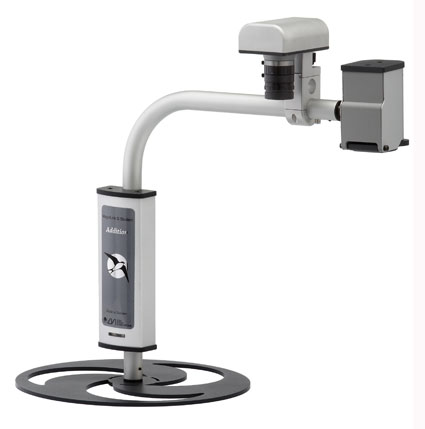
MagniLink OCR
The MLS OCR products are advanced portable CCTV solutions with the possibility to scan different kinds of printed documents. The MLS OCR concept allows you to easily access and
process printed texts wherever you are.Our OCR technology is available in two different products: the MLS OCR module and the MLS Office OCR. The MLS OCR module is used in combination with our popular products MLS Student Classic and MLS Student Addition, while the MLS Office OCR is used as a stand alone unit.
Computer connection
The MLS OCR products are connected to a laptop or desktop computer through a USB 2.0 port and all system functions are handled directly from the computer keyboard.Reviewing the text
With the MLS OCR products, you can examine a text before you decide to scan it. The camera presents a moving picture and you can also magnify the text. Once you fi nd the information that interests you, you can scan the text for editing, storing and automatic reading. It is possible to scan full pages or conveniently choose the sections of your choice in a document, for example a specific article. The large space underneath the camera allows scanning not only of documents, but also of thick books, binders and medical packages, etc.
When the OCR module is combined with one of the MLS Student cameras, you can easily switch between the pictures from the two cameras with a simple keystroke on the computer keyboard. Use the MLS Student camera for distance viewing, quick reading of printed documents, and object viewing.Reading Window
The OCR camera allows easy and quick scanning of written documents. The OCR processing converts the text into a computer font and displays it in a Reading Window. In the Reading Window, you can present the text in different high contrast modes, including false colours, and change the magnification without affecting the picture quality. From smallest to largest magnification the picture will always be crystal clear. At the beginning of the scanning process, you may decide if you want to use the new text separately, or if you want to add it to the previously scanned page, for example for book reading.Automatic Reading Mode
In the Reading Window, the text can also be presented in different Automatic Reading Modes that scrolls text, either word by word, in a rolling column or in a rolling line. It is then possible to read a complete text in high magnification without having to move the paper under the camera, or your head from side to side. Even while the scrolling continues you can change magnification, text colour and scrolling speed to meet your own needs and preferences.Text conversion to RTF
By simply pushing a button, you can also convert the OCR processed text into RTF (Rich Text Format) and transfer it to your word processing software, for example MS Word, where you can edit and store texts. This feature is ideal when you want to read a text later on, send it by email or paste it into other documents in your computer. In RTF, you can access the information with other software such as screen readers, speech synthesis and magnification software.OCR Settings
The installation of the software is very easy and the default settings guarantee immediate action with good results. A number of settings can be changed to adapt the software to individual preferences. For example, you can choose if you want to use text only, or if you also want to include pictures, either in colour or in black and white. Another setting is the possibility to choose different languages for the OCR scanning.
Main Features
Review and select information before scanning it
Change magnification and text colour in the Reading Window without affecting picture quality
Automatic Reading Modes; word by word, rolling column and rolling line
All functions handled from the computer keyboard
Total weight; MLS OCR module 0.3 kg (0.66 lbs), MLS Office OCR incl. base 1.4 kg (3.09 lbs)Minimum System Requirements
Microsoft® Windows® XP Home or Professional with Service Pack 2
One integrated USB 2.0-port (2 ports if used together with MLS Student)
Intel® Pentium® M processor 2.0 Ghz, 512 MB working memory (RAM), external graphics card with at least 128 MB of built-in memory.